


GPS Coordinates Tracker
4.73.00 Reviews
App Specs
- Version
- 2.11.0
- Updated On
- License
- Free
- Downloads
- 100,000+
- Developer
- Blazing App Studio
- Categories
- Maps & Navigation
- Platform
- Android
Screenshots
 Analysis by AppCompare
I judge a location app not only by whether it can put a dot on a map, but by how clearly it lets me understand and manage that location information. With GPS Coordinates Tracker, the appeal is practical: check where you are, look around a map, and keep places you may want to find again. That makes it a focused companion rather than a replacement for every navigation tool on a phone. I’d consider it for a day hike, a new neighborhood, or the simple problem of remembering where I left the car, while keeping expectations grounded in what a coordinate-focused app is meant to do.
A focused tool, not a complete travel system
GPS Coordinates Tracker is a free Maps & Navigation app from Blazing App Studio. It has a 4.7 average from around 4,500 ratings, and more than 100,000 installs. It is rated for everyone and currently at version 2.11.0; the stated minimum operating-system requirement is 7.0. Those details make it approachable for a broad range of users, but they don’t tell me whether it suits every device or every trip. Before relying on it outdoors, I’d install it at home, allow the phone to establish its location, and check that I can read the coordinates and map comfortably.
The important distinction is between checking a position and following a full turn-by-turn route. I’d use this app when I want a coordinate, a map view, or a saved point I can return to. If my priority is spoken directions through a complicated city drive, live traffic, or a carefully planned multi-stop journey, I’d choose a dedicated navigation service instead. A coordinate can be useful in a place with no obvious street address, but it is not automatically the easiest way to guide someone through a sequence of turns.
What I would check before trusting a location
Location can be sensitive, so I don’t treat a pin as harmless just because it appears on a map. A saved place might mark a home, a trailhead, a quiet fishing spot, or somewhere I visit regularly. I’d think about who can see a screenshot or an exported record before sending it, and I’d avoid sharing precise coordinates publicly when a general meeting point would do. That is a sensible habit for any GPS tool, not a claim about this app’s data practices.
I also recommend checking the phone’s own location controls rather than assuming an app needs unrestricted access all the time. Grant only the access that makes sense for the task, and review the choice if your use changes. If I’m merely checking one position, I don’t need to leave the app open throughout the day. For a hike, I’d test the workflow before setting off and keep a separate plan for navigation; a saved coordinate is most useful when I know how I will retrieve and interpret it later.
Small habits that make coordinates more useful
A useful saved point needs context. If I mark a trail junction, I’d give it a clear label that distinguishes it from the other junctions on the route. If I save a parking spot, I’d note a nearby level, entrance, or landmark in whatever note-taking method I use. Coordinates alone are precise, but they can be awkward to recognize later, especially when several pins are close together. This simple naming habit turns a collection of dots into something I can actually use.
For meeting someone, I’d send the coordinate together with a plain-language clue such as the entrance, trail sign, or side of the building. That reduces the chance of two people arriving at opposite sides of a large site while looking at the same general point. I’d also double-check that the map is showing the place I intend to share before forwarding anything. A brief pause to verify the pin is more helpful than assuming the first tap landed exactly where I wanted.
Worth Reading Before You Choose

EA SPORTS FC Mobile 26 Is a Bigger Football Game, but It Takes Time

Flipboard Shows What News Apps Must Do Beyond the Feed

Switching to Android Auto Means Rethinking Your Driving Routine

Google Calendar Makes a Crowded Week Easier to Manage

Ludo King Makes the Most of the Minutes Between Plans

Baby Panda World Brings Quick Play to Modern Phones, but Its Game Library Feels Busy
Where it fits—and where another app is better
Compared with a typical map app, a GPS-coordinate tracker has a narrower job: it puts the exact-position task closer to the foreground. That can be convenient when I’m recording a location, checking coordinates, or keeping a point for later rather than searching for a business or asking for a route. The trade-off is that general-purpose map apps are often the better choice when I need broad place discovery, transport options, traffic-aware directions, or a route shared with a driver. I’d keep both kinds of tool available if I travel often; they solve related but different problems.
This app makes most sense for hikers who want to note a junction, travelers who need to remember an exact pickup point, or anyone who regularly deals with places that don’t have a memorable street address. It is less suitable as the only navigation plan for a remote outing, and I wouldn’t choose a coordinate tool alone for a time-sensitive drive across an unfamiliar city. Before a trip, I’d save important places, make sure I can identify them on the map, and carry whatever offline map or paper directions the route requires. That preparation matters more than expecting one phone app to cover every failure point.
Cost and a cautious decision
The app is free to install, with in-app purchases listed at $14.99 per item. I’d try the basic experience first and make a purchase only after checking what it unlocks and whether it solves a real need for me. That’s a better approach than paying on the assumption that a paid option must improve accuracy or provide a particular feature. The age rating is Everyone, but I’d still treat location information thoughtfully when using a shared device or helping a younger user save places.
My overall view is that GPS Coordinates Tracker is worth considering when precise location checking and keeping useful places are the main jobs. Its value depends on a few practical habits: label saved points, verify a coordinate before sharing it, and have another navigation plan when the trip demands route guidance or offline reliability. If you mainly need everyday directions, your regular maps app may be simpler. If you often need to remember exactly where something is, this more focused approach can earn a place on your phone.
Have you ever found yourself lost in the middle of nowhere, wondering where the heck you are? Well, that's where GPS Coordinates Tracker comes into play. I’ve been fiddling around with this app for a while, and let me tell you, it’s a real lifesaver — or at least a sanity-saver when you’re out and about.
Getting Started with GPS Coordinates Tracker
First things first, downloading GPS Coordinates Tracker is a breeze. Just head over to the App Store or Google Play, hit download, and you’re good to go. The app’s interface is straightforward, and even if you’re not tech-savvy, you’ll get the hang of it in no time. It’s designed with user-friendliness in mind, which I absolutely appreciate.
Features That Stand Out
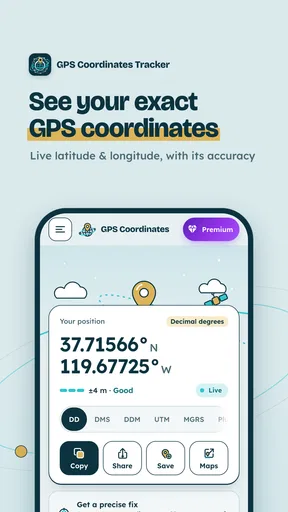
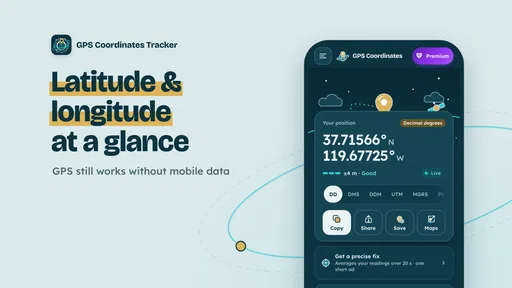
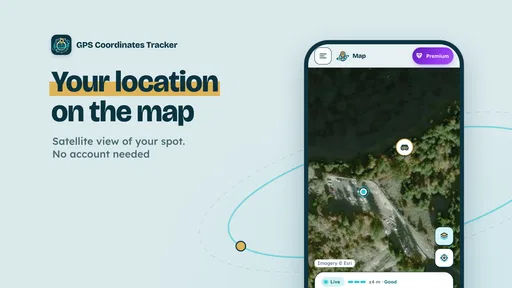
Now, let’s dive into what makes this app tick. The primary feature, as the name suggests, is tracking your GPS coordinates. Whether you’re hiking in the woods or navigating through city streets, you can see exactly where you are on the map. The accuracy is pretty impressive, and I’ve found it to be reliable in various terrains and conditions.
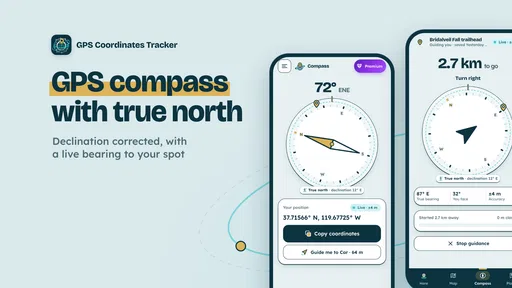
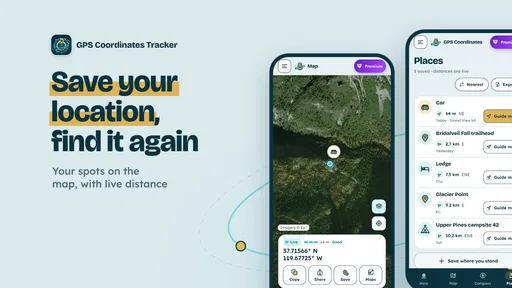
But wait, there’s more! The app allows you to save your locations, which comes in handy if you want to revisit a particular spot or share it with friends. You can also export your tracked routes, which is perfect for keeping a record of your adventures. Another neat feature is the compass, which helps you navigate more precisely.
How It Fits Into Daily Life
So, how does one incorporate GPS Coordinates Tracker into everyday life? Well, for starters, it’s a gem for travelers and outdoor enthusiasts. I’ve used it on several hiking trips, and it’s great for marking trails and ensuring you don’t stray off the path. Plus, if you’re a geocaching fan, this app is a must-have for pinpoint accuracy.
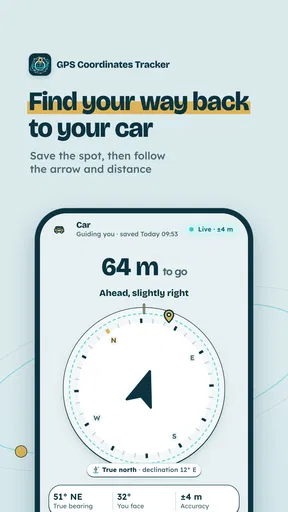
Even if you’re just running errands around town, it can be surprisingly useful. Ever parked your car and then forgotten where it is? Just drop a pin on your location, and you’ll never have to wander around the parking lot aimlessly again. Trust me, it’s a game-changer.
Room for Improvement
No app is perfect, right? While GPS Coordinates Tracker does a lot of things right, there are a few areas where it could improve. Sometimes the map loading times can be a tad slow, especially in areas with weak network coverage. It’s not a deal-breaker, but it’s something to keep in mind if you’re in a rush.
Also, while the app is generally intuitive, a quick tutorial or guide for first-time users wouldn’t hurt. It’s easy to navigate once you’ve played around with it, but a little help right at the start could make it even more accessible.
Final Thoughts
All in all, GPS Coordinates Tracker is a solid choice for anyone in need of a reliable navigation tool. Whether you’re exploring the great outdoors or just trying to keep track of your favorite spots around the city, this app has got you covered. It’s like having a personal guide in your pocket, ready to help you find your way at a moment’s notice.
If you’re curious to try it out, you can find the download links on our site and get started on your next adventure. Happy exploring!
Pros
- Accurate real-time location tracking.
- User-friendly interface.
- Low battery consumption.
- Offline map access available.
- Customizable alerts for location changes.
Cons
- Occasional signal loss in remote areas.
- Limited features in the free version.
- Ads can be intrusive.
- Requires frequent updates.
- No integration with some third-party apps.
FAQs for GPS Coordinates Tracker
What features does the GPS Coordinates Tracker offer?
The GPS Coordinates Tracker provides real-time tracking of your location, allowing users to easily share their coordinates with friends or family. It includes features like location history, offline maps, and the ability to set geofences. The app also offers customizable alerts and integration with popular navigation apps.
Is the GPS Coordinates Tracker easy to use for beginners?
Yes, the GPS Coordinates Tracker is designed with user-friendliness in mind. Its intuitive interface ensures that both beginners and experienced users can navigate its features with ease. The app includes a simple tutorial for first-time users, making the setup process straightforward and quick.
Does the GPS Coordinates Tracker work offline?
Yes, the GPS Coordinates Tracker supports offline functionality. Users can download maps for offline use, ensuring continuous access to location tracking even in areas with limited or no internet connectivity. This feature is particularly useful for outdoor adventures or remote travel.
How accurate is the location tracking in GPS Coordinates Tracker?
The GPS Coordinates Tracker provides highly accurate location data using advanced GPS technology. While accuracy may vary slightly based on environmental factors like terrain or weather, the app consistently delivers reliable location information, making it suitable for precise navigation and tracking needs.
Is my data secure with GPS Coordinates Tracker?
Absolutely, user privacy and data security are top priorities for GPS Coordinates Tracker. The app employs robust encryption methods to protect user data and ensures that only authorized individuals have access to your location information. Users can manage privacy settings to control data sharing preferences.


